
Rohos Disk v.1.5 – new Rohos Disk Browser

(updated on July, 24)

We are glad to announce new Rohos Disk and Rohos Mini v.1.5  with updated Rohos Disk Browser application. Rohos Disk Browser enables you to open and view the contents of secret partitions on a USB drive on any other computer, even if you do not have administrative rights.

Download v.1.5

What’s new:

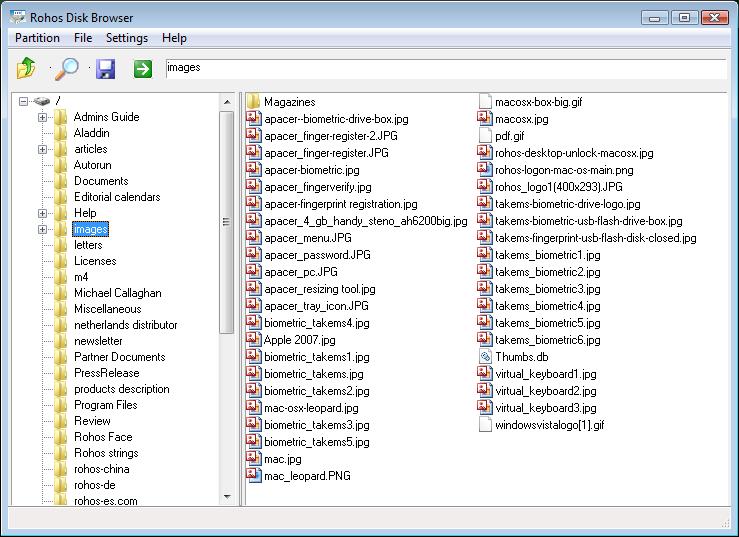
  1. List of file names now are sorted in alphabetic order
  2. List of files now has a small icons and looks just like in Explorer
  3. Fixed bug of wrong folder icon under Vista/Seven
  4. Improved Unicode support for FAT/FAT32
  5. Added Virtual Keyboard. Press “***” button to open VK and click it to type in your password.
  6. Improved translation handling. Now language is automatically taken from global settings. However there are translation issues  – if Disk Browser is opened without Admin rights on Vista (enabled UAC), therefore it is recommended to run Rohos Disk Browser with full privileges.
  7. Improved error reporting
  8. Fixed bug in Rohos Disk driver that leads to Windows Error (Blue Screen) after pulling out USB drive (that contains Rohos disk container file) without disconnecting Rohos disk.
  9. Added Traditional Chinese language UI
  10. Added Umikey OTP token support.

Screen shot:

List of file names are in alphabetic order
Special Offer – 30% off.

Dear users and customers, this summer we offer a special discount for all Rohos products.

Buy or upgrade and save 30%

Read more

Rohos Logon Key v.1.7.3 (for Mac). Good-Bye Tiger.

We are glad to announce new release of Rohos Logon Key for Mac v.1.7.3 – two-factor authentication solution based on USB tokens, for Mac OS X 10.4/10.5 and coming 10.6. This version offers better support for Snow Leopard and improvements for ‘Bluetooth logon’ feature.

ANN For “Tiger” (10.4) users: We decided to stop support for Mac OS X 10.4 on Rohos Logon Key 1.7.2. This setup package contains a special folder named “Tiger” with Rohos Logon Key 1.7.2.

ANN For “Snow Leopard” users: Please use setup package from folder “Snow Leopard (10.6 x64)”.

Download v.1.7.3

What’s new:

  • Fixed “Allow to log in only by USB key” feature. In some cases it was possible to log in using password.
  • For ‘Snow Leopard’ we fixed “Unlock screen saver by USB key” feature. Now it works OK.
  • Improved German translation thanks to Tobias Langer.
  • Improved “Bluetooth logon” feature:
    • Now it is possible to define PIN code for two-factor authentication by using Mobile device.
    • Improved Bluetooth discovery. Now Rohos Logon should not lock the screen
      unexpectedly after login by detected Bluetooth device.