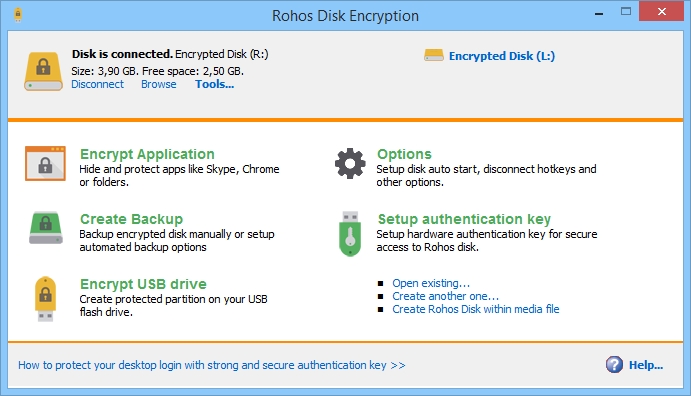
Rohos Disk Encryption and Rohos Mini Drive are discontinued

Rohos Disk Encryption and Rohos Mini Drive are discontinued

After more than 20 years of development, we have decided to discontinue Rohos Disk Encryption and its free edition, Rohos Mini Drive. The products can still be used on Windows 7/10 and will be available for purchase.

Why are we making this decision:

Both products rely on a kernel-mode disk driver to mount encrypted partitions as regular drive letters. Microsoft has changed how Windows decides which drivers it trusts. Starting with the April 2026 Windows update, Windows 11 no longer loads drivers signed under the old cross-signing program by default. Only drivers certified through the Windows Hardware Compatibility Program (WHCP) and signed by Microsoft are accepted. This applies to Windows 11 24H2, 25H2, and 26H1, Windows Server 2025, and all future versions.

You can read Microsoft’s announcement of the new Windows driver policy here: Windows driver policy

Producing a new driver that meets these requirements would take significant development effort and ongoing certification costs. For a product of this size, we cannot justify that investment.

What this means for you

  • Windows 7, 8, and 10: Rohos Disk Encryption and Rohos Mini Drive continue to work in full mode. You can continue to create, mount and use your encrypted drives as before.
  • Windows 11: The Rohos Disk driver may be blocked, so encrypted drives cannot be mounted as a drive letter.

How to access your encrypted data on Windows 11

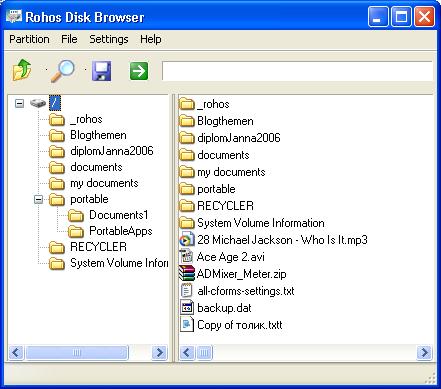
Your data is safe and remains accessible. Use Rohos Disk Browser to open your encrypted drive, browse your files and copy them to any folder. Disk Browser:

  • Works without a kernel driver, encrypting and decrypting in user mode.
  • Opens Rohos encrypted partitions on USB drives, container files and containers hidden inside media files.
  • Is free, portable and open source.

We recommend that Windows 11 users open their encrypted drives with Disk Browser and move important files to a new storage solution at a convenient time.

Thank you

Rohos Disk has been with many of you since the mid-2000s, protecting USB drives, laptops and cloud folders. We are deeply grateful to every customer who trusted us with their data, sent us feedback, reported bugs and helped shape the product over two decades.

Our other products, including Rohos Logon Key, remain under active development.

If you have questions about accessing your data, please contact our support team.

Rohos Disk Encryption v.3.3 and Rohos Mini update

This is a bug-fixing update.

What’s new in Rohos Disk v3.3:

  • Updated Rohos Disk Browser
  • Fixed 2FA authentication methods compatibility with Rohos Logon Key setup.
  • Minor performance improvements for the Encrypted Folder feature.

Download Rohos Disk Encryption v3.2 (15 day Trial) >

This update is free for registered users. We also update Rohos Mini setup package with the improvements mentioned above.

About Rohos Disk Encryption

Rohos Disk program allows you to encrypt your computer, USB flash drive, or Cloud folders. It is designed for those who have megabytes of sensitive files and who is really concerned with privacy and information security. To protect access to encrypted data you can use electronic keys like USB flash drive or security Keys or Smartphone. You may also work with secret files by using Rohos Disk for Android. 

Download Rohos Disk 15-day trial>

Get your copy of Rohos Disk Encryption license>

View the complete list of Rohos Disk Encryption features> 

Rohos Disk and Rohos Mini 2.3

July 1, 2016 saw the release of new versions of Rohos Disk Encryption and its free counterpart Rohos Mini. These applications received a facelift and improved internal design.

Read more

Rohos Mini and Rohos Disk v.1.8. Keep folders hidden!

(updated February 10, 2011)

You share your computer with somebody but would rather keep your data private??? It’s not always possible. Using Google Chrome, Mozilla Firefox and Skype??? Well, for an experienced user it’s a piece of cake to find and look through your Skype chat’s logs without being signed into your account. And now you can keep all those gawkers away from your computer data with Rohos encryption programs.

Rohos Developers have been asked to implement “Hide folder” feature which in future will eventually step-by-step lead to the long-awaited feature – complete Account Encryption (all applications and data are encrypted) but about this you’ll learn more later.

“Hide folder” option in Rohos Mini Drive and Rohos Disk Encryption brings affordable and AES 256 strength encryption solution to your security issues by preventing unauthorized access to your private data in PC folders by local or network users. Your protected items can be quickly and easily rendered inaccessible to other users but are instantly accessible when you turn on your Rohos disk.

Read more

Rohos Mini Drive – “on-the-fly” encryption without Admin rights

In the video is presented how you may work with encrypted partition on a PC without admin rights using free portable encryption solution, Rohos Mini Drive, that securely protects your portable data on any USB device. Portable utility Rohos Disk Browser gives you opportunity to work with your sensitive data on USB in a usual way on any PC (even on internet cafe, where you don’t have admin rights).

In the video you will see:

  • Opening Encrypted part of USB drive by a password.
  • Opening files (with on-the-fly decryption) with associated application.
  • Saving files with on-the-fly encryption from application.
  • Playing mp3 files.
  • Browse all photos from a folder in thumbnail view (by using Virtual Folder command).
  • Launch portable applications.

With this functions Rohos Mini Drive is the most wanted tool for portable data security recommended by many bloggers and magazines.

Encrypted files are one click away with Rohos Disk v.1.7

Your USB flash drive data protection and its portability demands are increasing, yet with today’s offers we have in software community there are small chances you might find a worthwhile application.

So what do you use to password protect your USB drive and have secure access to your encrypted partition on Public PCs without having administrative rights?

Long time anticipated by fans of portable encryption solutions possibility to create an encrypted area on a USB disk/key that a user can open/mount, double click and open the files, and close as required, without Admin rights is now implemented in Rohos Data Security solutions Rohos Disk Encryption and Rohos Mini Drive. You do not need Administrative privileges, and yet you can double click and open say a Word doc, and then save it to the same place without leaving any traces of working with it.

You may say – “There are solutions that have a portable disk Explorer utility that allows working with an encrypted disk without Admin rights”. Yes, but very few disk encryption solutions provide decent disk Explorer performance. Meaning that in many of them you can only extract a file outside the disk Explorer and then open it.  After some changes to the file have been done, if any, you should Import file back to the Disk Explorer. In this case “on-the-fly” encryption principle doesn’t work.  The obvious disadvantages of such approach – ‘unencrypted files’ may be left behind on a guest PC or unsecured part of the USB flash drive, and you can’t work with big files.

Try Rohos Disk Encryption (shareware) or Rohos Mini Drive (freeware) and discover:

  • File Virtualization. Open files via Rohos Disk Browser in associated application without first decrypting them into temporary folder. Rohos virtualizes file presence for the application, thus it works with encrypted file by using “on-the-fly” encryption principle.

Read more

On-the-fly encryption without administrative rights.

On-the-fly encryption without administrative rights is possible!

As you know many disk encryption softwares lack the ability to be used on a Public computers (without having Administrative rights). Because they need to install virtual disk driver first, but this is possible only when you have Administrative rights (i.e. only on your Home PC). This issue becomes more significant when portable encryption solution is needed.

Encrypted disk explorers
A very few disk encryption solutions have a portable Disk Explorer utility that allows working with an encrypted disk image in an off-line manner (without mounting virtual disk letter). But you can’t work with the files as regular, you can only extract the needed file outside Disk Explorer and then open it. Then you need to Import file back to the Disk Explorer if you have changed it. In this case “On-The-Fly encryption” principle doesn’t work. And there is security disadvantage – you may leave ‘un-encrypted files’ somewhere, and you can’t work with big files.

But now Rohos Mini Drive enhances portable encryption and offers “On-The-Fly encryption” even in traveler mode by using Rohos Disk Browser:

  • Now you can double click any file to open it immediately in associated application. And work with it in a regular way.
  • You can open big files (for instance watch an encrypted AVI file, listen to music).
  • There is no ‘un-encrypted’ data stored on a Guest PC or unsecured part of USB flash drive.
  • you can run Portable Applications! (experimental feature. not all of the Apps may work)

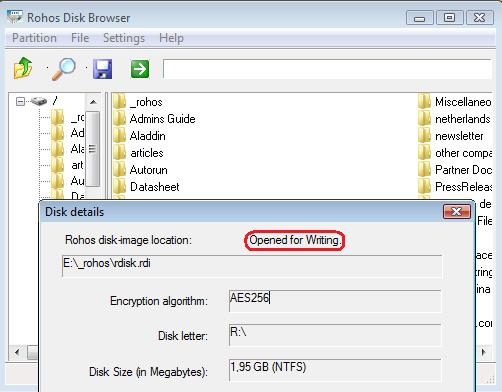
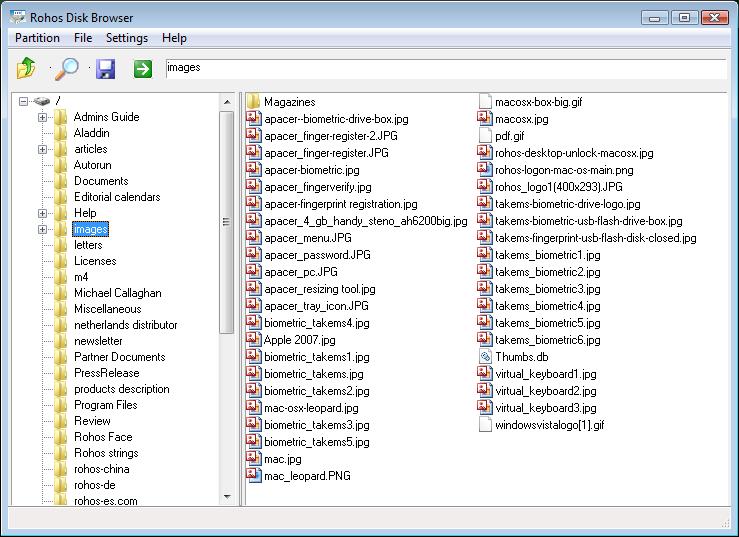
Rohos Mini Drive creates encrypted partition on any USB flash drive and you can use it on any PC. You can also use this partition on Public PCs without having administrative rights. This is possible by using Rohos Disk Browser that allows opening any Rohos partition container (FAT/FAT32/NTFS, read/write), browse it, extract files and now Virtualize Files for any application.
Read more

Rohos Disk v.1.6. Rohos Disk Browser supports NTFS in “read-write” mode.

Exciting news!

Rohos Disk Encryption brings new and exciting opportunities for its users  to work with encrypted partition created on USB flash drive in NTFS format. Now NTFS partitions opened on a PC with no Admin rights via Rohos Disk Browser work in “read-write” mode.

Rohos Disk Encryption is one of the leading solutions for data security has enhanced opportunity to use your secured disk in the most effective way. Having large encrypted partitions, e.g. 100 GB, you easily work (read and edit) with your data on any PC.

Download v.1.6

What’s new:

Rohos Disk Encryption – choose the right solution for your precious data security.

Rohos Disk v.1.5 – new Rohos Disk Browser

(updated on July, 24)

We are glad to announce new Rohos Disk and Rohos Mini v.1.5  with updated Rohos Disk Browser application. Rohos Disk Browser enables you to open and view the contents of secret partitions on a USB drive on any other computer, even if you do not have administrative rights.

Download v.1.5

What’s new:

  1. List of file names now are sorted in alphabetic order
  2. List of files now has a small icons and looks just like in Explorer
  3. Fixed bug of wrong folder icon under Vista/Seven
  4. Improved Unicode support for FAT/FAT32
  5. Added Virtual Keyboard. Press “***” button to open VK and click it to type in your password.
  6. Improved translation handling. Now language is automatically taken from global settings. However there are translation issues  – if Disk Browser is opened without Admin rights on Vista (enabled UAC), therefore it is recommended to run Rohos Disk Browser with full privileges.
  7. Improved error reporting
  8. Fixed bug in Rohos Disk driver that leads to Windows Error (Blue Screen) after pulling out USB drive (that contains Rohos disk container file) without disconnecting Rohos disk.
  9. Added Traditional Chinese language UI
  10. Added Umikey OTP token support.

Screen shot:

List of file names are in alphabetic order

Rohos Disk v.1.4

We are glad to announce Rohos Disk Encryption v.1.4

What’s new:

  • More tools for additional disks: Browse, Create disk shortcut.
  • New “Options” allows to choose/change UI language and enable/disable log files
  • Now by default Rohos doesn’t write log files for troubleshooting purposes
  • Improvements in “Connect Disk” dialog
  • Minor fixes and UI improvements in main window
  • Fixed Autorun feature. Now Rohos correctly runs shortcuts with command line options.

Screen shots:

Read more