How to access your encrypted partition on a guest PC in Windows 7
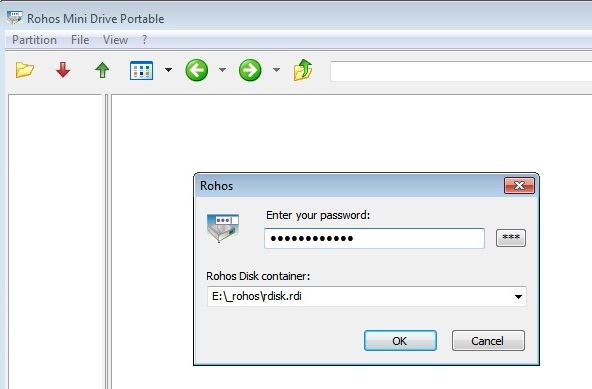
Rohos Disk Encryption and Rohos Mini Drive software presents tools that encrypt and hide your private, confidential data on the USB flash drive or HDD. Both programs include Rohos Disk Browser utility that gives the possibility to access your encrypted disk even as a guest or user with no Administrative Rights. You can open and look through encrypted disk, add new information, even if you do not have administrative rights. It is also possible to view content of the encrypted disk on a computer where Rohos Disk was never been installed.
On a guest computer where you have no administrative rights Rohos Mini Drive Portable will be automatically launched and you will be able to work with your encrypted partition, which is seen as Windows Explorer.
Read more
Halloween party 20% SALE Rohos software!

Till 31st October we announce 20% SALE of Rohos software. Save your money and increase your computer safety.
Rohos Logon Key Two- factor authentication solution that converts any USB drive into a security token for your computer and allows to access Windows in secure way by USB token, replacing the Windows login.
Rohos Logon Key for Mac Rohos Logon Key turns any USB drive into a security key for your Mac. Using Rohos Logon Key you can add hardware level protection for your Mac.
Rohos Face Logon The program is designed to add authentication convenience and additional security level to the standard Windows logon procedure. It allows logging into Windows computer in an easy, fast and secure way by using any Windows compatible camera.
Rohos Disk Encryption The program creates hidden and protected partitions on the computer or USB flash drive. Best encryption software that protects your sensitive data on internal or removable drives. It also offers “on-the-fly†encryption even in traveler mode by using portable utility – Rohos Disk Browser.
Maintenance release for Rohos Disk Encryption v. 1.9
 Good news for Rohos Disk fans. We announce the new release of the software with some more improvements. These features are not so evident but they help to make application more suitable for users. Improvements are applicable for both Rohos Disk Encryption v. 1.9 and Rohos Mini Drive v. 1.9
Known issues:
- When you connect your secured disk with help of Rohos Mini from the USB flash drive the windows explorer will be opened automatically after you enter the password.
- When you decide to delete the disk from the USB flash drive this will remove all the Rohos files. This reduces manual cleaning of the USB thumb.
- When you use CD/DVD as a vault for your private data: while opening the hidden partition Rohos Disk Browser will show you the path. Even if you have renamed it previously for higher confidentiality Rohos is able to determine it quickly.
- Minor bug fixing.
Lock your Mac with Rohos Logon Key.
This new video shortly presents the way Rohos Logon Key works in Mac OS X. It shows the main options and features of the new software release. Rohos Logon Key allows to use any USB key for secure authentication in Mac. We also will see that Rohos Logon Key allows you to quickly LOCK or UNLOCK your Mac with the help of USB flash drive. It turn your USB flash drive in secure token to protect your laptop. The authentication solution is able to unlock System preferences.
Coming soon FREE Rohos Logon Key for Mac.
How to create password protected and encrypted CD\DVD
 Many users keep important personal information on HDD and did not realize they need to create a safety copy of the files – Backup. It is necessary to make a personal archive on the CD/DVD periodically. And more important is to protect the data medium. You can transport private data on CD without been stressed about data security. Even if you lost the CD with confidential information nobody will have access to this secret information (documents, private photos, music, video). To provide good privacy protection on the CD the data should be password protected and encrypted.
Rohos Disk Encryption is a perfect tool to encrypt CD\DVD. This requires a blank CD\DVD, Rohos Disk Encryption already installed on the computer, and an application for CD burning (e.g. Nero, Roxio Creator, Express Burn, Windows 7 CD\DVD burning feature).
Windows login with secure RFID token Wireless PC Lock
“Wireless PC Lock” devices are now available in Rohos Logon Key. Wireless PC Lock (read more…): model KW-101, model KW-102 with Timer by SPIRIT-ON Enterprise Co. Ltd, Wireless PC Lock V 900 by VSON TECH Ltd have been integrated in Rohos Logon Key v. 2.9
Standard features of the Wireless PC Lock :
- Lock/unlock Windows desktop using wireless RFID tag
- Effective range 6-8 meters.
- Your have the transmitter in the pocket, the RFID signal will be received automatically. And You don’t have to plug in the device into PC each time (like regular USB Keys supported by Rohos Logon)
- Password backup – unlock desktop by a password if your RFID tag is lost or not available now.
A few disadvantages:
– If you use passwod for Windows login – you need to enter it anyway to start your Windows or unlock it (after a Sleep for example).
– When you start your Windows the PC Lock program start working with a 5 second delay thus leave your desktop unlocked for a while.Â
– When you load Windows in Safe Mode the PC Lock doesnt work
Benefits of Rohos Logon Key + Wireless PC Lock :
- Windows authentication support – replaces your Windows password with Wireless PC Lock tag.
- Windows login and screensaver unlock by Wireless tag – no need to remember and enter your Windows password.
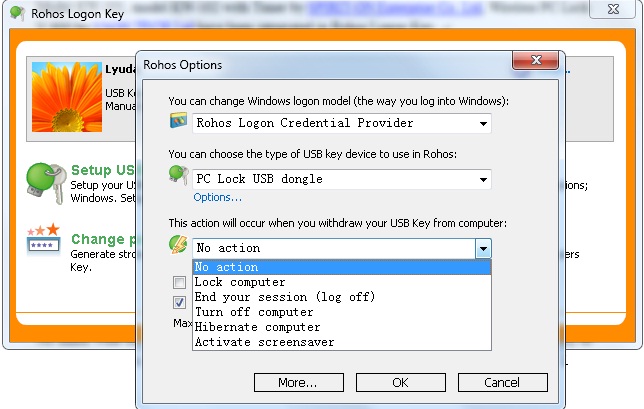
- Possibility not only to lock desktop but also to Log Off, Hibernate (Sleep) or activate secure screensaver when you step away from PC with Wireless RFID tag in the pocket.
- Allows to set up several RFID tags (transmitters) for access to one computer.
- Rohos protect login even in Windows Safe Mode .
- Emergency Logon in case your RFID tag is broken or lost.
How to set up Wireless PC tokens for Windows login:
No mater what model of PC Lock you use, the procedure is the same. Install Rohos Logon Key to your computer. In Rohos Option window choose the type of the authentication device “PC Lock USB dongleâ€.
Wireless PC Lock – USB stick and wireless token in your pocket
Recently we were asked by our customers – is this possible to use “Wireless PC lock” tokens with Rohos Logon Key for user authentication into Windows. This week we got a sample of this product into our Lab and we are going to test it and then integrate into Rohos if possible.
We ordered our sample from SPIRIT-ON Enterprise Co. Ltd based on Taiwan. This hardware vendor produces PC accessories including RFID devices. This is the basic idea of the wireless token (scanned from the box):
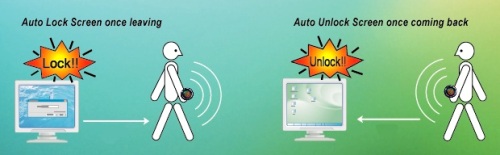
When you step away from the computer with the token – it locks the desktop immediately and vice versa coming back will unlock the desktop.
Rohos Face Logon v. 2.7 secure biometric authentication for two or more users
 Rohos Face Logon – secure authentication by the face recognition. The process of authentication is made in one step and is based on uniqueness of human face. It allows accessing Windows computer in a easy, fast and secure way by using any Windows compatible camera.
Program is easy to setup, has simple interface, self-training feature and possibility to hide authentication window. Often there are situations when one computer is used by several users e.g. office computer for co-workers, home computer or notebook for family members. Rohos Face Logon can register several users for different users account.