Rohos Logon Key v.4.9
We are glad to announce Rohos Logon Key 4.9 with a new feature with an audit trail for 2FA configuration changes.
Read more
We are glad to announce Rohos Logon Key 4.9 with a new feature with an audit trail for 2FA configuration changes.
Read moreThis is a short announcement to confirm that all the latest versions of Rohos software products are fully compatible with the latest Windows 11 operating system. We continue to develop Rohos product line by adding new features according to our plans. We appreciate all of our users and customers for the valuable feedback while choosing Rohos cyber security solutions.

Rohos Software compatible with Windows 11:
We are glad to announce Rohos Logon Key 4.8 with automated prevention over ‘Two-Factor Authentication bypass scenarios’. The new experimental feature allows to get an immediate push notification on the smartphone when the Two-Factor Authentication (2FA / MFA) procedure is avoided during login/unlock or reconnecting to console or remote sessions. Because of well-known system vulnerabilities that allow RDP session hijacking, never-ending stories with 0-day exploits in RDP protocol or authentication system, and unattended remote tools like TeamViewer or 2FA credentials theft during fishing and social engineering – all these lead to unpredictable threat models and risks.
Rohos Logon commits to experimental innovation to address these issues. Currently, Rohos Logon Key app uses three simple rules to trigger push notifications and lock the session in case of Two-Factor Authentication bypass. This allows for defining response and mitigation in case of unknown vulnerabilities of the authentication procedure. The experimental approach works well for standalone Terminal Servers, AD farms, cloud servers in AWS or Azure, workstations, or personal laptops as well. In the future, we plan to add more rules and response actions that allow mitigating authentication vulnerabilities of Windows system, Rohos or human factors. Currently, Rohos Logon Key is the only 2FA application in the world that offers self-control backward loopback, starting from the login prompt to the RDP session desktop. Read more about how it works.
Rohos Logon Key v.4.7 now has multiple improvements, allows using U2F FIDO security keys as a second authentication factor for Remote Desktop access. This makes Rohos absolutely unique solution that allows using U2F keys for Remote Desktop 2FA login as well as console-based login.
We also added an experimental feature to Rohos Logon to work as a password filler for the LastPass browser extension (experimental).
During pandemic remote access became very popular and sometimes mandatory due to restrictions. Rohos Logon Key allows protecting remote access with convenient two-factor authentication. Rohos may easily work over a classic Microsoft RDP as well as other popular solutions like TeamViewer, AnyDesk, VNC, UltraVNC, MagicConnet , Proxy Networks, LogMeIn, pcAnywhere etc. Currently Rohos Logon Key is the only solution that allows to protect Terminal Server remote access with U2F security keys which is being considered as the strongest authentication factor today.
What’s new in Rohos Logon Key v.4.7 :
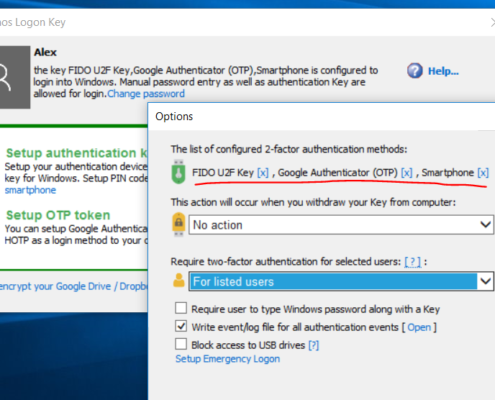
We continue to improve Rohos Logon Key towards intelligent Multi-Factor Authentication decision framework. With new Rohos Logon Key 4.6 you can use multiple kind of authentication methods and devices in parallel. Now you can introduce a new MFA authentication procedure on-the-fly without stopping using the current old one. Starting a pilot with a new authentication device was never such easy as now with Rohos Logon.
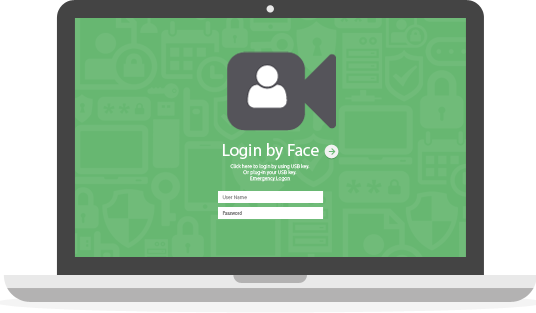 We are glad to announce new update for Rohos Face Logon that allows to set adaptivity level for face recognition. This allows quicker login in any lighting conditions.
Whats new in brief:
 We have published Rohos Disk Encryption v.2.7 with new experimental functionality “Encrypt Folder”. This feature that allows to encrypt your Cloud Storage folders like OneDrive, Google Drive and others. Now Rohos is able to encrypt arbitrary files on a computer and thus Cloud Synchronization and Backup tools uploads fully encrypted data to the cloud since the sensitive data appeared on the computer.
In order to work with the files you need to enter password and use special drive letter within Explorer or Any other application. Read how it works or download now.
We are glad to announce new Rohos Logon Key v4 for Windows. Now it has a possibility to combine two-factor authentication methods for a single desktop or user and define rules to support multi-factor authentication (MFA) control. Since 4.0 Rohos Logon Key will introduce rule-based multi-factor authentication decision support framework that brings MFA intelligence depending on access context. It automatically selects strong authentication method for privileged users or remote desktop access and convenient single-factor authentication when you use Windows computer in regular way on a desktop.
We are working towards to add new authentication experience for Windows login and now Rohos Logon Key v.3.8 allows to use any supported 2FA authentication device in combination with One Time Password authentication method (Google Authenticator). This will help to apply strong two-factor authentication with local or remote access. With this features we will start to introduce rule-based multi-factor authentication decision framework into Rohos Logon Key.
Whats new in new Rohos Logon Key v.3.8 in brief: